

Table of contents
Imagine your sales team starting the day with a list of qualified leads, follow-up messages ready to go, meetings already scheduled, and quotes waiting for your approval, without your salespeople having to run every step by hand. That's what becomes possible once you build a sales agent and connect it to your company's workflow and systems.
A sales agent is not just a chatbot that answers customer questions. It can be configured to search for sales opportunities, qualify leads, follow up on conversations, schedule meetings, prepare quotes, and track deals all the way to close.
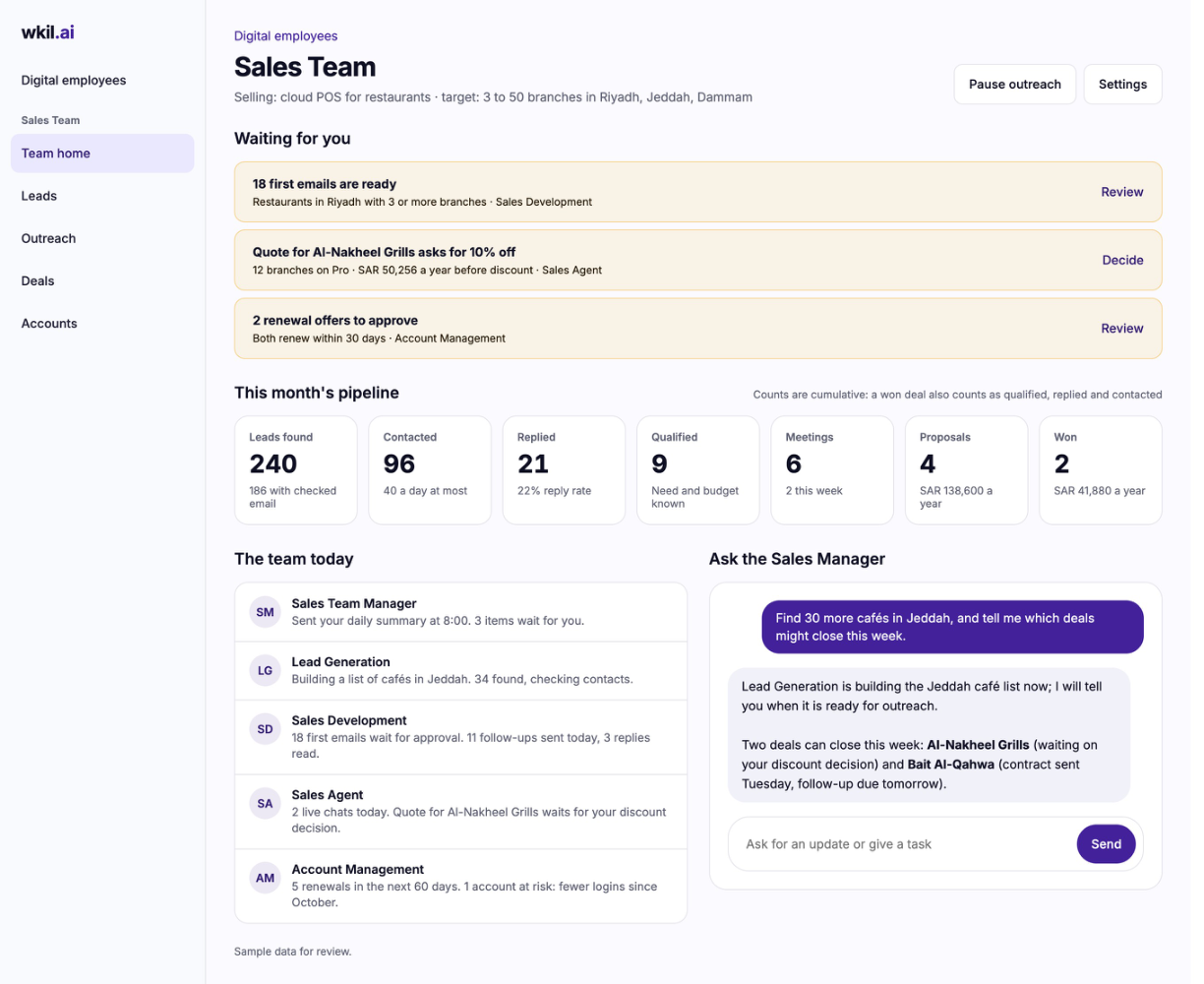
But what if you need to run the entire sales cycle, not just one task? That's where a digital sales team comes in — it splits the responsibilities across a group of specialized agents, each one owning a specific stage, with all the stages working together as one process.
In this guide from the Wkil platform, we'll walk through how to build a sales agent, when you need a full team of agents, and how to organize the work from finding a lead to closing the deal and renewing the subscription.
What is a sales agent?
A sales agent is a digital system that uses AI to understand sales goals, handle customer information, and execute allowed tasks within the rules and permissions the company sets.
It can work through email, website chat, or WhatsApp, depending on the available integrations, drawing on product data, pricing, and customer records to give responses tied to actual needs.
The core difference between a sales agent and a traditional chatbot is that the agent isn't limited to answering a question. It can move to the next step in the process — updating a customer record, drafting a follow-up message, scheduling a meeting, or asking the sales manager to approve a special offer.
One sales agent or a digital sales team?
If your goal is answering inquiries and qualifying leads coming from your website, a single sales agent may be a fine place to start.
But if you want to find new customers, start outreach, manage opportunities, send quotes, and track renewals, it's better to split these responsibilities across specialized agents. In this model, the sales team is made up of five connected roles.
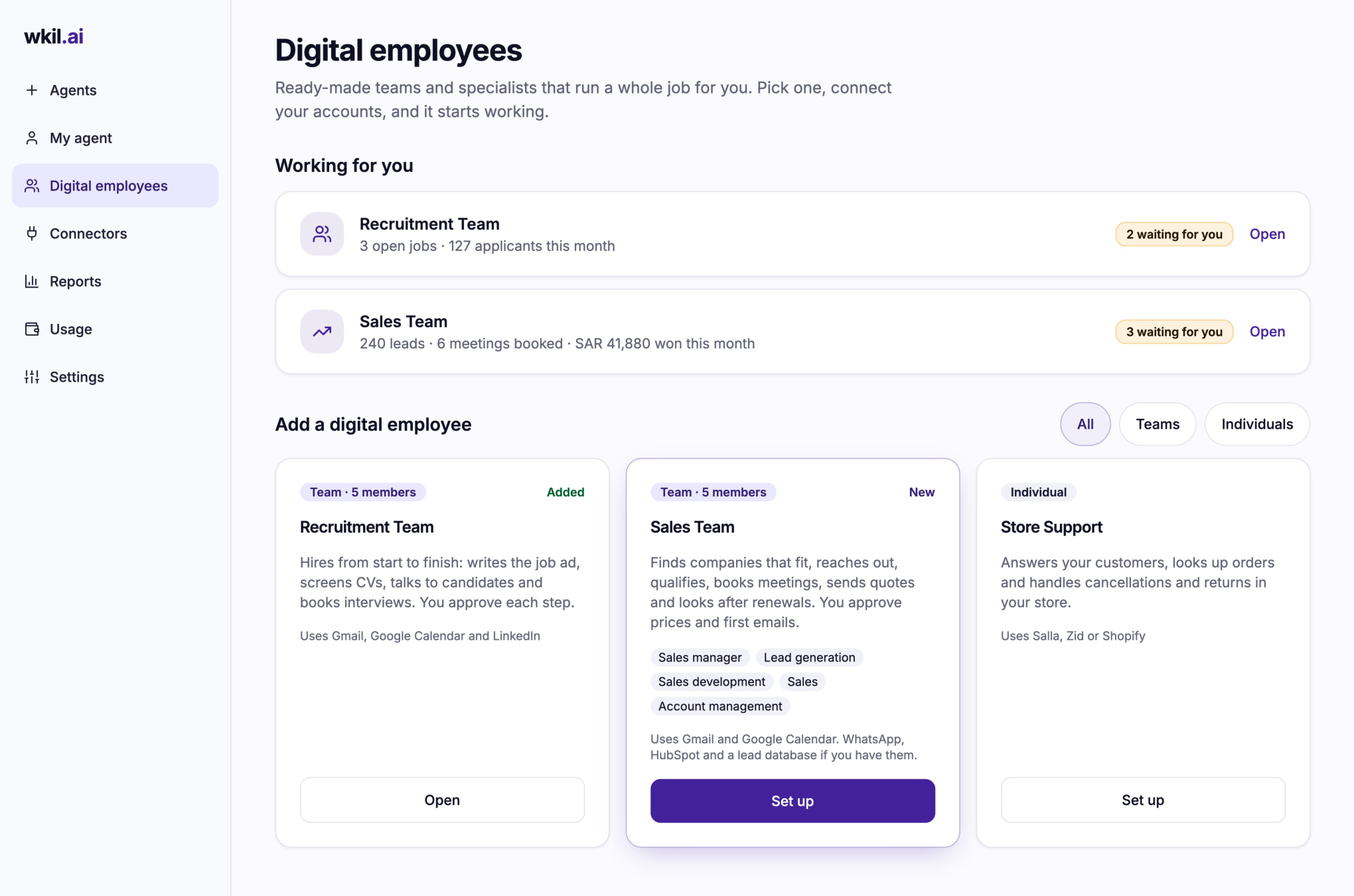
Sales Team Manager
Tracks the team's work and coordinates tasks between agents, giving the human sales manager a clear picture of how things are going. It can be configured to prepare a daily summary covering new opportunities, scheduled meetings, deals that need a decision, and overdue tasks.
Instead of opening several systems to see what's happening, the user can just ask it: "Which deals are expected to close this week?" or "What needs my approval today?"
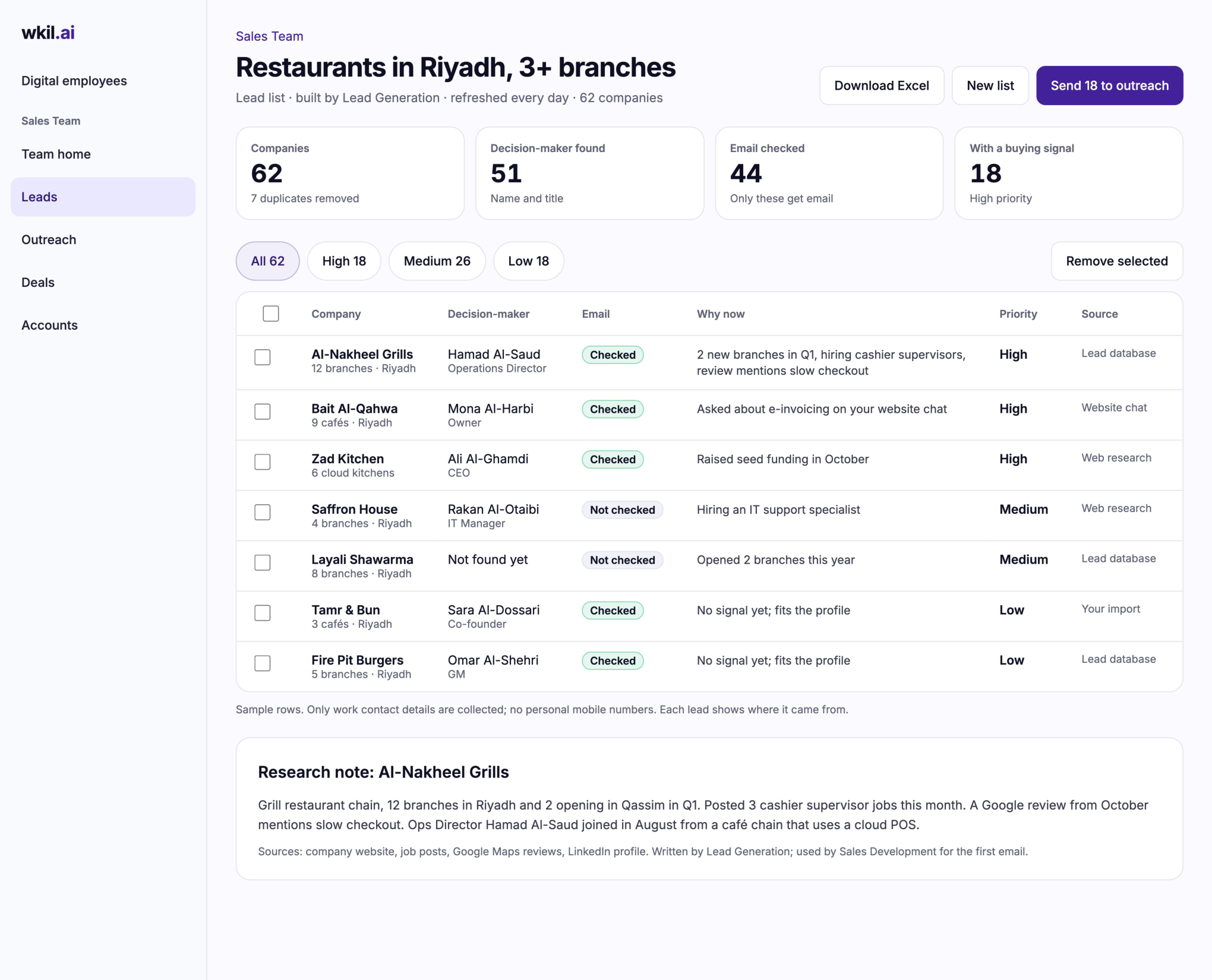
Lead Generation Agent
Sales starts with finding the right companies and people. This agent searches for leads against defined criteria — industry, company size, geography, and the roles responsible for the purchase decision.
It can organize the results, remove duplicates, identify professional contacts, document the source of each lead, and surface buying-signal indicators.
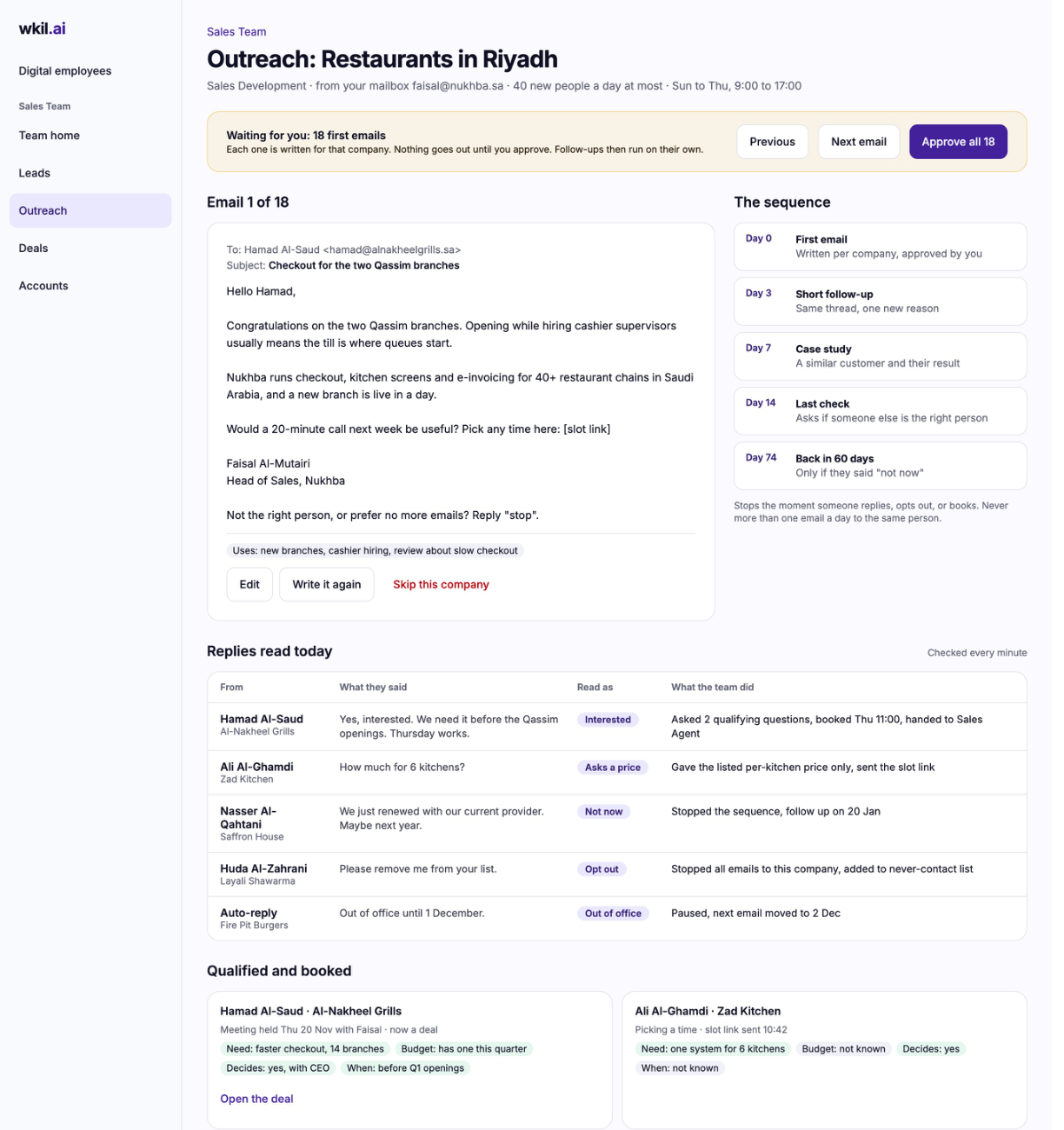
Sales Development Agent
Once leads are identified, the Sales Development Agent takes over. It drafts personalized outreach messages based on each company's actual need, tracks replies, asks qualifying questions, and schedules meetings with interested leads.
Instead of sending the same message to everyone, it can tailor outreach to each company's activity and the information available about it. It can also be configured to stop follow-ups the moment a lead replies or asks not to be contacted.
Sales Agent
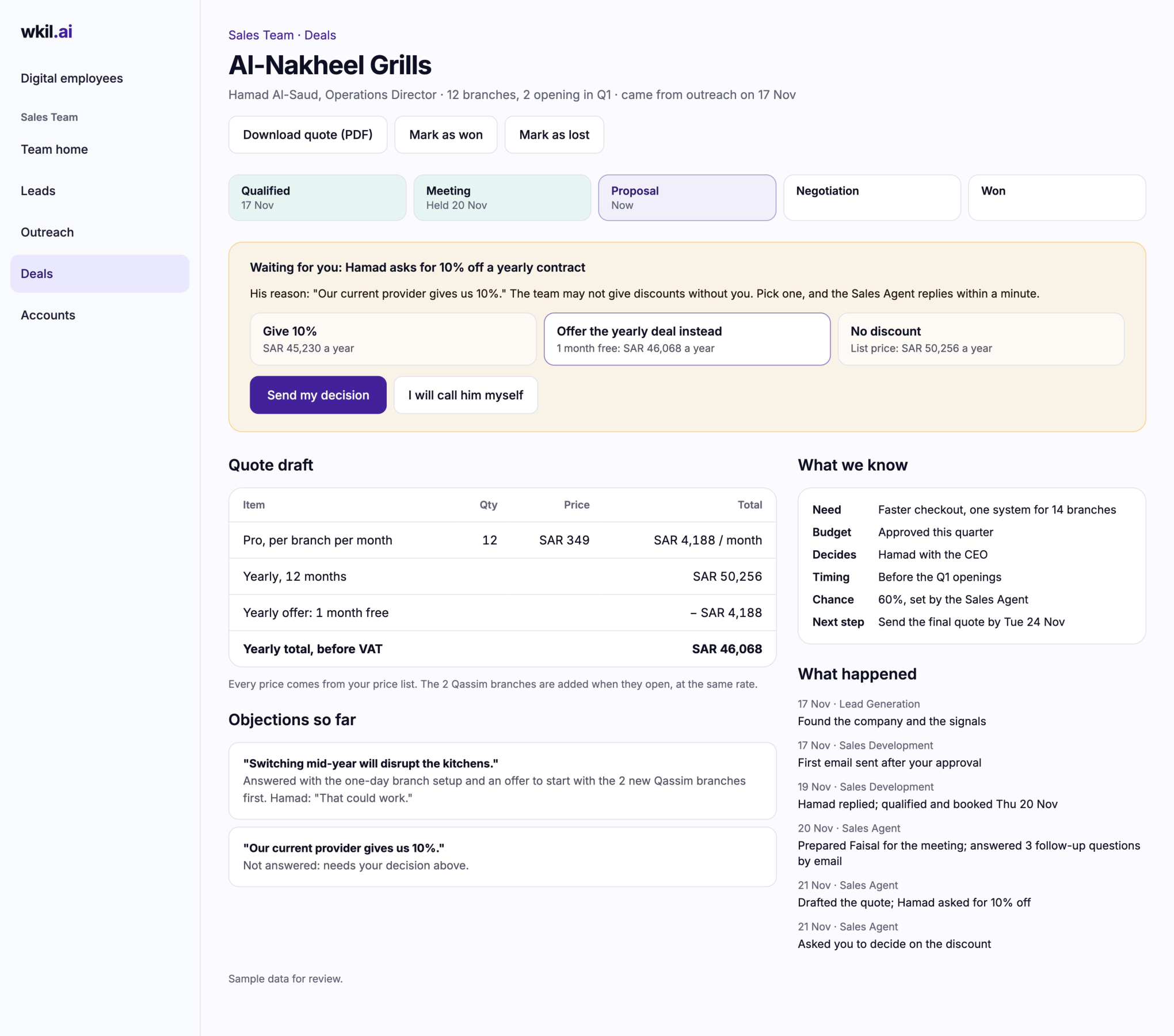
Once a lead is qualified to buy, the Sales Agent takes the next stage. It helps understand the customer's needs, answers product questions, presents suitable options, and prepares quotes based on the approved price list.
It can handle common objections and update the deal's status, while escalating any decision beyond its permissions to the human in charge.
Account Management Agent
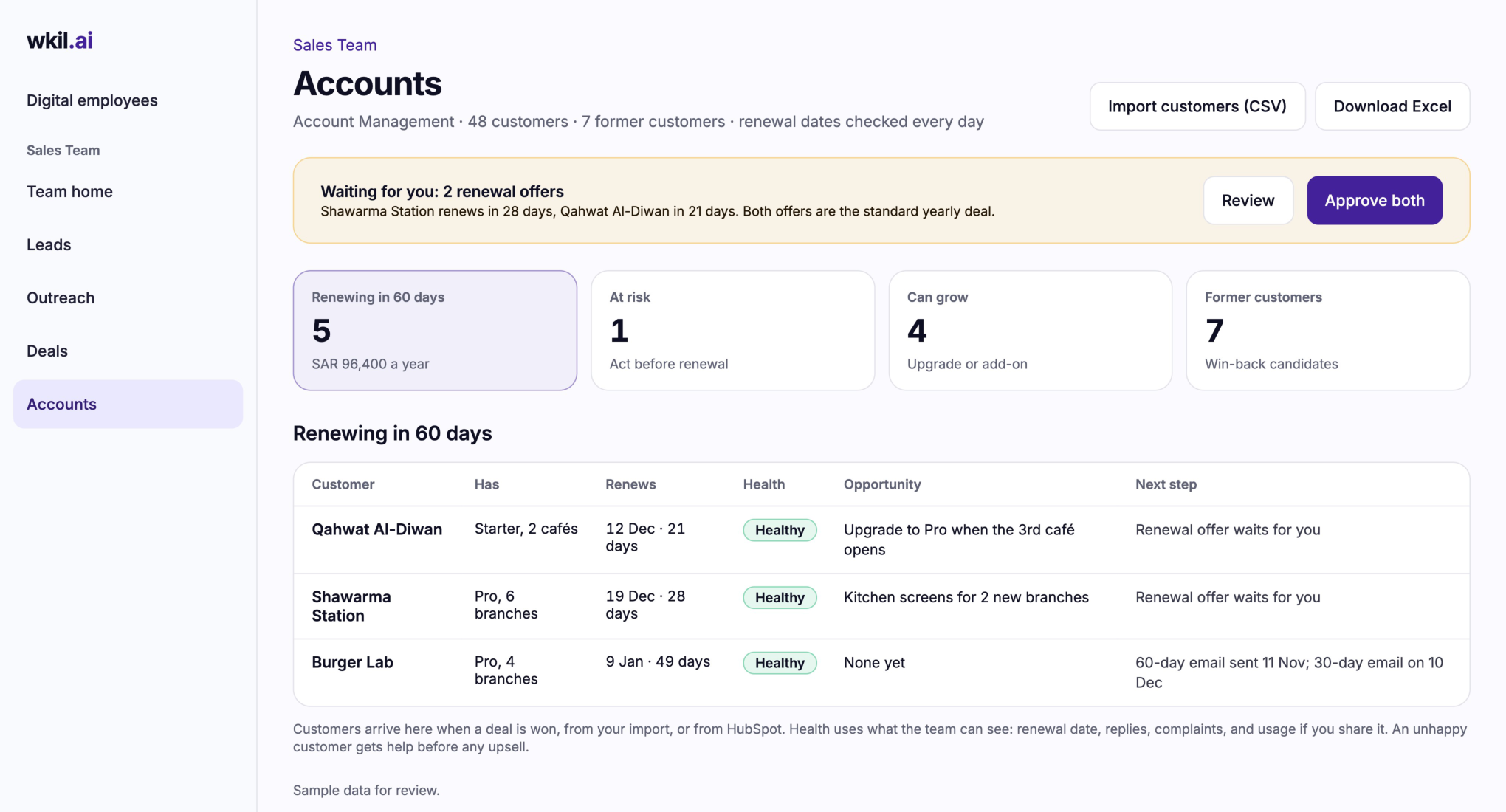
The sales cycle doesn't end when the deal is won. The Account Management Agent tracks existing customers, monitors renewal dates, identifies upsell and cross-sell opportunities, and follows up with past customers when it's the right time to reach back out.
This way, managing the relationship after the sale becomes a real part of the sales cycle, not a separate task that's easy to forget.
How to build a sales agent step by step
How does a digital sales team work in practice?
To see the full picture, say a company wants to sell a tech system to a restaurant chain.
- 1Find the lead
- 2Start outreach
- 3Qualify the lead
- 4Meeting and proposal
- 5Close the deal
- 6Follow up with the customer
Stage one: finding the lead. The lead generation agent searches for restaurants matching the criteria, and identifies companies showing expansion signals or a likely need for the system.
Stage two: starting outreach. The sales development agent prepares a tailored message explaining the reason for reaching out and the potential benefit to the company. The message is sent according to the approved approval policy.
Stage three: qualifying the lead. If the lead shows interest, the agent starts gathering the basics: what problem are they trying to solve? Is there a budget? Who makes the decision? When do they expect to implement the project?
Stage four: the meeting and the proposal. Once the lead is qualified, the agent helps book the meeting, then the file moves to the sales agent to prepare a proposal from the approved pricing and plans.
Stage five: closing the deal. The sales agent follows up on objections and questions, requests approvals when needed, and keeps the deal's stage updated.
Stage six: following up with the customer. After the sale closes, the account management agent tracks renewal dates and expansion opportunities, and documents anything that needs the team's attention.
This way, customer information moves between roles without needing to be re-entered at every stage.
Automatic follow-up, managing deals, and integrations
One of the biggest challenges in sales is losing good opportunities because follow-up was too slow. You can build a message sequence that starts with the first outreach, then a short follow-up a few days later, then a relevant example or extra information, then one final attempt to confirm interest.
If the lead replies, the automatic sequence stops and moves into qualification or the appropriate conversation. If they ask not to be contacted, that request must be respected and messages stopped per the approved rules. And if they say the timing just isn't right, a future follow-up date can be logged instead of continuing to send messages.
What matters is that follow-up stays tied to the lead's actual status, not just a fixed chain of messages sent regardless of how they respond.
Agents can also organize the deal cycle through clear stages — starting from qualification, then meeting, proposal, negotiation, and on to either winning the deal or closing it as lost. The deal record keeps the information needed to make a decision: the customer's need, budget, decision-maker, expected timing, the proposal made, and the last contact.
For example, if a customer asks for a discount on an annual contract, the sales agent can prepare options for review — the base price, the approved annual offer, or the requested discount. But the final decision on any commercial exception stays with the authorized person. This way the company gets both fast quote preparation and control over financial and contractual commitments.
A sales workflow can be built on the integrations available on the Wkil platform and the systems your company already uses — things like Gmail for managing correspondence, Google Calendar for organizing meetings, HubSpot for logging customers and deals, plus WhatsApp and website chat for receiving leads. What the agent can actually do depends on the type of connection, the permissions it's been given, and each integration's settings, so it's important to test the data flow between tools before relying on it in daily operations.
How do you track the team's performance?
Knowing how many messages the agent sent isn't enough. What matters is being able to track leads' progress through the sales cycle. Indicators worth measuring include:
- The number of leads found.
- The number of contacts that were verified.
- The number of leads contacted who responded.
- The number of qualified leads and booked meetings.
- The number of proposals sent and deals closed.
- Deal value and upcoming renewal dates.
These indicators help the sales manager pinpoint which stage needs improvement — lead quality, messaging, qualification, or turning proposals into closed deals. The digital team manager can prepare a summary of this data and flag cases that need a human decision.
Is a sales agent a replacement for a salesperson?
Not necessarily. The core value of a sales agent is cutting down repetitive work and helping the team run its operations more consistently.
It can support research, follow-up, triage, proposal preparation, and reporting, while staff and managers keep ownership of sensitive decisions, complex negotiation, and building strategic customer relationships. A company can start with a single agent, then add specialized agents whenever it needs to expand the scope of automation.
Frequently asked questions about building a sales agent
Want to build a sales agent for your company?
Building a sales agent doesn't start with picking an AI model — it starts with understanding your company's sales process. Define who you want to reach, what you're selling, how you qualify leads, what permissions the agent needs, and when the decision should move to the sales manager. From there, you can grow from a single agent to a team of agents working together on finding leads, outreach, qualification, proposals, and account management.