

Table of contents
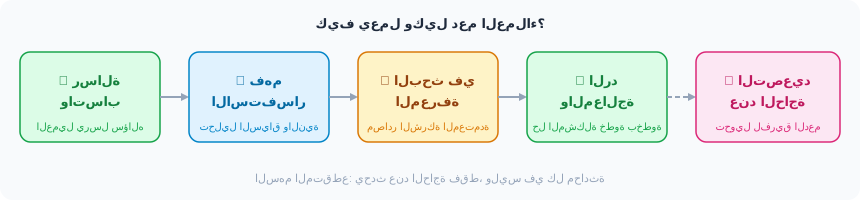
Imagine a customer sending a WhatsApp message late at night about a problem they are having with your service. Instead of waiting until the morning shift starts or bouncing the message between team members, they find a support agent that can understand their query, search your company's approved knowledge, and walk them through a resolution step by step.
If the issue needs human involvement, the agent can collect the relevant details and hand the request to your support team — without the customer having to explain the problem all over again.
That is the goal of building a WhatsApp customer support agent that runs on your company's knowledge and procedures, not a scripted chatbot that serves a list of preset buttons.
In this guide from Wkil, we walk through how to build a WhatsApp customer support agent — setting its role, adding knowledge sources, defining escalation rules, connecting the channel, and testing it before it goes live with real customers.
What is a WhatsApp customer support agent?
A WhatsApp customer support agent is an AI-powered digital agent configured to understand customer queries in natural language and respond using the company's approved information.
It can help customers understand how to use products and services, navigate settings, work through common issues, and answer questions about available plans and features — all based on the information the company provides, not on general guesses.
When a problem is linked to a customer's account or requires permissions the agent does not have, it can collect the relevant details and route the request to the support team with the full conversation context.
This is different from a traditional chatbot. The customer does not need to pick from a long list of buttons to reach an answer. They can type their question naturally, and the agent handles it based on the knowledge and instructions it has been given.
What can a customer support agent do?
Before building the agent, it helps to define the specific tasks it will handle. An agent is more effective when its role is focused rather than trying to cover everything at once.
1. Answer customer questions
The agent can be equipped with product and service documentation, settings guides, and FAQs. For example, a customer using a technology platform might ask "How do I connect my email to the agent?" or "How do I deploy the agent on my website?" The agent searches the company's knowledge sources and explains the right steps — without needing a support team member to answer every individual query.
2. Help resolve technical issues
The agent is not limited to explaining services. It can be configured to help customers work through common technical problems. If a customer says "My agent is not responding to messages," the agent can follow the company's approved troubleshooting steps one at a time — presenting the first step, then waiting for the customer to confirm before moving to the next.
3. Create support tickets
Not every issue can be resolved in the conversation itself. Issues related to billing, account access, or permissions may need a human team member. In these cases, the agent can gather the required information — email address, issue description, steps already tried — and submit a support request through the connected tool. It should not tell the customer a ticket was created until the submission has actually completed.
4. Escalate to a team member
Knowing when to stop handling an issue and hand it to a person is one of the most important functions of a support agent. If the agent cannot find a reliable answer, the problem persists after going through the support steps, or the customer asks to speak with someone, it should follow the company's escalation process — sending a structured summary to the team so the person who picks it up has full context.
5. Recognize sales opportunities
A support conversation can sometimes become a commercial one. After an issue is resolved, a customer might ask about a plan that lets them add more agents or whether the service works for another team. The agent can be configured to recognize this interest and route it to the sales team, but solving the support issue always comes first.
How to build a WhatsApp customer support agent step by step
Frequently asked questions about building a WhatsApp support agent
Summary: build a support agent that fits your company
Building a WhatsApp customer support agent is not just about connecting a phone number to an AI model. For the agent to be genuinely useful, it needs to know the company's products and services, understand the support procedures, follow the established communication style, work through problems step by step, and know when to route a conversation to a qualified person.
Start by defining the agent's role clearly, then add complete and up-to-date knowledge sources, configure the communication and escalation rules, connect the right channel, and test the core scenarios carefully before going live with real customers.
With ongoing monitoring of performance metrics and recurring questions, you can refine the knowledge base and procedures based on what your customers actually face.
At Wkil, you can start building a customer support agent suited to your business — equipping it with your company's information and instructions and connecting it to the tools your work depends on.