

Table of contents
Managing social media accounts does not stop at writing a post and publishing it. Behind every successful account there is a content plan, ideas connected to the audience, text suited to each platform, visuals aligned with the brand identity, a publishing schedule, and ongoing monitoring of results.
As platforms multiply and the need for consistent content grows, managing all of this becomes a challenge for businesses and marketing teams — especially when responsibilities are split across more than one person or tool.
This is where a social media agent comes in: a system that can be configured to help organize these operations, execute repetitive tasks, and connect the stages of content production in a single workflow.
But what if you want to go beyond creating posts and build a system that manages planning, writing, design, publishing, and analysis together? You can then build a digital marketing and content team made up of specialized agents, where each agent handles a specific stage and the final decisions stay under your control.
In this guide from Wkil, we walk through how to build a social media agent, equip it with your brand identity, set a weekly plan, create posts, schedule publishing, and use performance results to continuously improve your content.
What is a social media agent?
A social media agent is an AI-powered digital agent that helps execute the tasks involved in managing social media accounts.
It can be configured to understand the company's business, its target audience, its writing style, and its visual identity — then use that information to produce content suited to the platforms the company operates on.
Its tasks may include suggesting post ideas, writing copy and hashtags, creating designs, organizing the publishing schedule, and tracking performance metrics through available integrations.
Its value is not only in producing content faster, but in organizing the work between planning, execution, and review.
One agent or a full digital marketing team?
You can start with a single agent if you need a specific task covered, such as writing posts or suggesting content ideas.
But if you want to manage the full content cycle, it is better to split responsibilities across several specialized agents working as one team. In the model we present here, the marketing and content team is made up of six roles:
1. Marketing and content team manager — receives your requests, coordinates work between agents, and tracks task progress and approvals.
2. Content strategy agent — prepares the content plan and editorial calendar, defining topics, post types, the right platform, and the suggested timing.
3. Content writing agent — turns approved ideas into publish-ready copy, following the brand's tone and the specified language.
4. Creative design agent — prepares images and designs for posts using the approved visual identity elements.
5. Publishing management agent — schedules content and sends it to connected accounts, then monitors publishing status and verifies that each post went through successfully.
6. Performance analysis agent — tracks post results and turns numbers into information that helps you improve future content.
How to build a social media agent step by step
How does the agent build a weekly content plan?
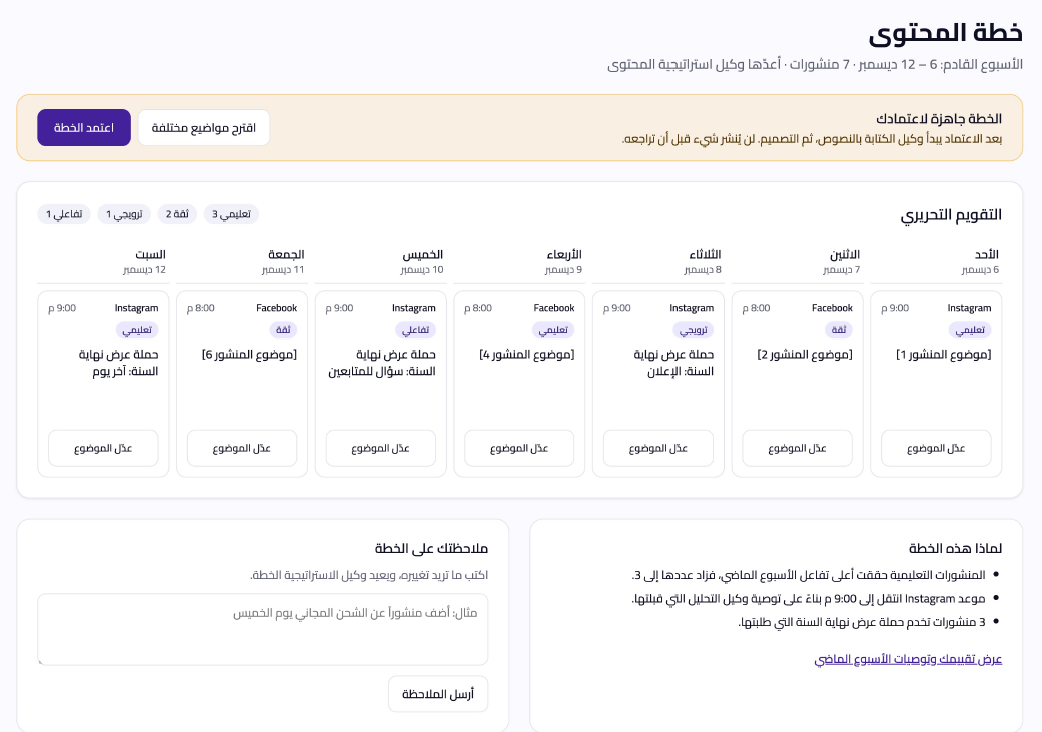
Good planning helps businesses publish cohesive content rather than treating each post as a separate idea. The content strategy agent can prepare a weekly calendar that shows each post's topic, its type, the platform it will go to, and the suggested time.
For example, a weekly plan might include seven posts distributed roughly as follows:
- Three educational posts explaining the company's services or sharing useful information with the audience
- Two trust-building posts introducing the audience to the brand's expertise
- One promotional post highlighting an offer or service
- One engagement post encouraging followers to participate
This is an illustrative distribution, not a fixed rule for every business. You can review the plan, change topics, adjust the number of posts, or ask for focus on a particular campaign.
If you request a year-end sale campaign, for example, the strategy agent can suggest spreading the campaign's posts across different days within the calendar. After the plan is approved, topics move into the content writing and design stage.
How does the agent write, design, and review posts?
Writing the posts
After a post topic is approved, the content writing agent begins preparing the copy. The agent should consider the post's goal, the target audience, the brand's established style, and reliable product and service information.
A post might include an opening hook, a concise explanation of the idea, a clear call to action, and relevant hashtags. Content can be prepared in Arabic or English depending on the company's requirements.
Designing the visuals
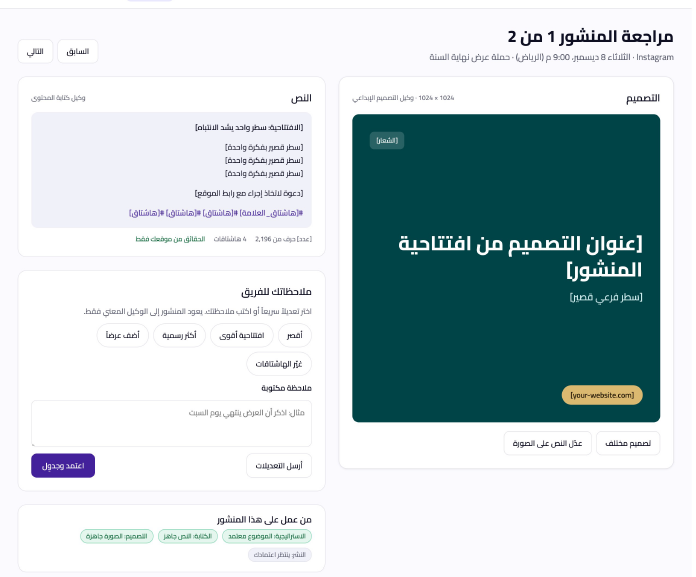
Once a post idea is approved, the creative design agent needs to know the main message that should come through visually. It draws on the identity set up during configuration — the logo, colors, and content nature — so designs stay consistent with the brand identity.
During review you can ask for a different design, less text on the image, or a completely different approach. It is important to verify the accuracy of text and visual elements before approving them, especially when numbers or service and product details appear.
Reviewing posts before publishing
The review stage is an essential control point. You can request edits such as:
- Shortening the post or making the opening stronger
- Changing hashtags or adding details about an approved offer
- Adjusting the writing style to be more or less formal
- Modifying the design or the text shown on the image
Notes are directed to the agent responsible for that task, so you do not need to rebuild the whole post when changing just one part. When the result is right, you approve the post and allow it to be scheduled.
Scheduling and publishing
After copy and design are approved, the post moves to the publishing management agent. The agent handles the publishing schedule and connected accounts through the available tools, then monitors the status of each operation.
It is important to verify that publishing succeeded — confirming that the post actually went live rather than failing silently. If an image could not be fetched or a platform returned an error, the status should be recorded clearly and a retry made available in a way that prevents duplicate posts.
How does the agent measure and improve content performance?
Reading performance metrics
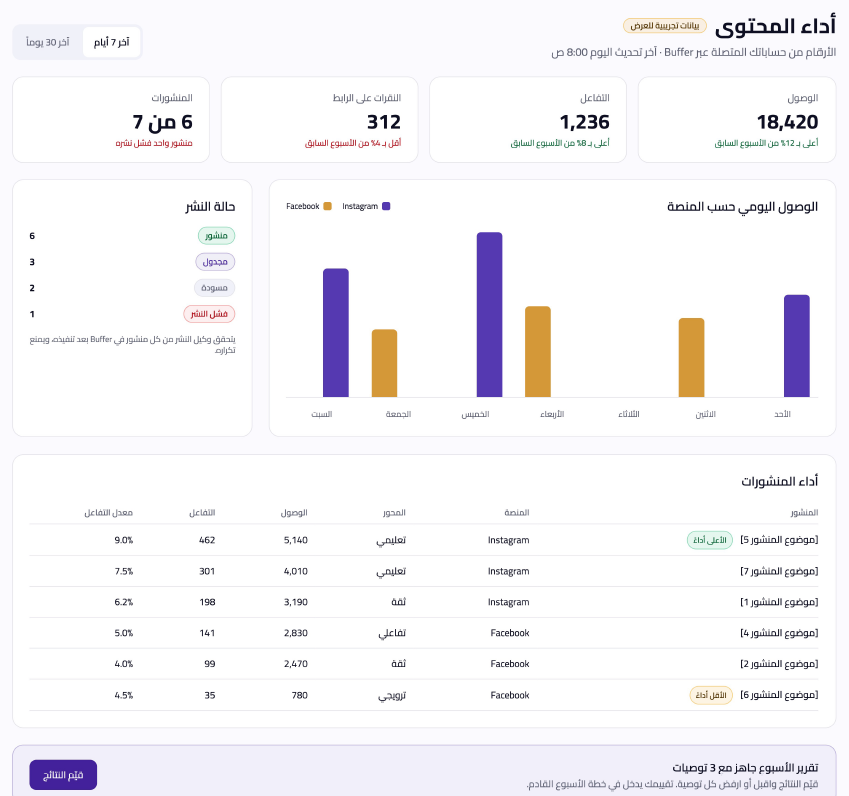
After content is published, the performance analysis agent can use data available from connected accounts to prepare reports that help you understand the results. The key metrics to track include:
- Reach: the number of people or accounts the content reached, as defined by each platform
- Engagement: likes, comments, and shares based on available data
- Link clicks: how many times links connected to the content were clicked
- Engagement rate: an indicator that helps compare post performance
- Publishing status: posts published, scheduled, in draft, and operations that failed
A single number is not enough to judge content success. An educational post may achieve higher engagement than a promotional one, while the promotional post serves different goals — such as driving customers to a service page or offer.
Using results to improve the content plan
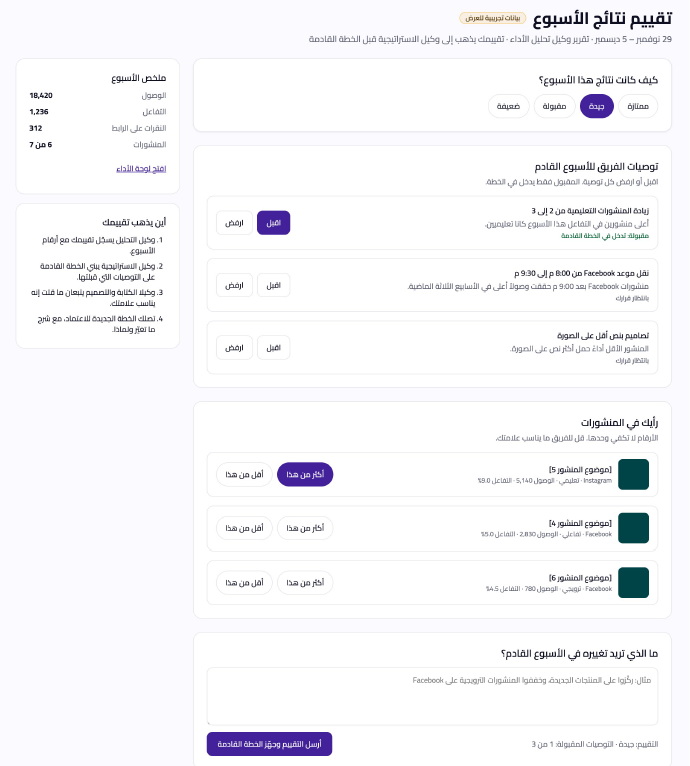
One of the main advantages of working with a complete agent team is the ability to use last week's results when preparing next week's plan.
Say educational posts performed better than other types. The analysis agent might suggest increasing the number of educational posts in the upcoming plan. If account data shows that certain posting times achieved higher reach, it might recommend trying different times.
But no recommendation should be treated as a confirmed result or applied automatically. You can review each one and accept or reject it, then add your own assessment of the content. After that, the content strategy agent uses the approved recommendations when preparing the next plan.
This turns content improvement into a continuous process driven by both numbers and input from the person responsible for the brand.
Practical example: managing a marketing campaign end to end
Say you run a company and want to launch a short year-end sale campaign. You can start by sending the team manager a message:
"I want a year-end sale campaign starting next week, running on Instagram and Facebook."
Stage 1: Planning — The content strategy agent adds the campaign to the weekly calendar and lays out the suggested topics and timing.
Stage 2: Approval — You review the plan and approve it, or ask to adjust some topics.
Stage 3: Writing — The content writing agent prepares post copy based on the approved offer details and the company's identity.
Stage 4: Design — The creative design agent creates the images for the posts using the brand's visual identity elements.
Stage 5: Review and publishing — You review the copy and designs, then approve the posts that are ready, which move into the publishing schedule.
Stage 6: Measuring results — The performance analysis agent tracks the available metrics and delivers a summary and recommendations for improving the next plan.
This is how a campaign moves from an initial idea to a plan, published content, and a performance report within a connected workflow.
Frequently asked questions about social media agents
Summary: start with a social media agent, then build a complete marketing team
Building a social media agent is not just about creating a tool that writes posts for you. The real value appears when the stages of content production are connected in an organized workflow — starting with understanding the brand and audience, then preparing the plan, writing the copy, preparing the designs, reviewing, publishing, and analyzing the results.
You can start with a specialized agent for a specific task, then expand to a digital marketing and content team that distributes responsibilities across multiple agents, while keeping control over plans, approvals, and important decisions.
At Wkil, you can explore how to build agents suited to your company's needs and connect them to your workflows and tools.