

Table of contents
Imagine a customer sending a message at midnight asking about their order. Instead of waiting until your support team starts their shift, they get a reply that shows the order status, its contents, and the expected delivery time — all pulled from your store's live data.
When another customer asks to cancel an order, request a refund, or change a delivery address, the agent can handle the request according to the policies and permissions you set in advance — or escalate to you when your approval is needed.
That is the goal of building a customer service agent connected to your online store's real operations.
Customer service automation is no longer just about chatbots that return scripted answers. Today it is possible to build agents that read order data, understand customer queries, help execute actions, and route requests that need human judgment.
In this guide from Wkil, we walk through how to build a customer service agent for your online store step by step — from connecting the store and adding policies, through setting permissions and testing, to going live and tracking performance.
What is a customer service agent?
A customer service agent is an AI-powered digital system that can be configured to understand customer queries, access store-related information, and execute permitted tasks through available integrations.
For example, when a customer asks "Where is my order?", the agent can query the store system for the order, then share relevant details about its current status after verifying the customer's identity.
If the customer asks to cancel, refund, or change a delivery address, the agent reviews the order status, the store's policy, and the configured permissions before taking action or requesting approval.
This makes the agent part of the actual customer service workflow — not just a front-end for answering questions.
How is it different from a traditional chatbot?
A traditional chatbot typically relies on scripted paths or pre-written answers. When a customer asks about the return policy, it might send a policy link or a fixed block of text.
A customer service agent can be configured to understand conversation context, connect the query to live order data, and execute the right action.
When a customer says "I want to cancel my order," the agent does not just send the cancellation policy. It can check the order, determine whether it has shipped, and apply the available action within its permissions.
If the cancellation requires the store owner's approval, it routes the request with the relevant details so a decision can be made — rather than making it alone.
What can a customer service agent do inside your store?
1. Order and shipment tracking
Order status inquiries are among the most common tasks an agent can handle. The customer provides the order number and completes identity verification using the email or mobile number linked to the order. After verification, the agent displays available information: order status, items, total amount, and shipping status.
2. Order cancellations
The agent can be configured to handle cancellation requests in line with the store's policy. If the order has not yet shipped and the permissions allow automatic cancellation, the action can be completed through the integration. If the order has shipped or exceeds the permission threshold, the agent routes the request to the store owner rather than deciding on its own.
3. Refund requests
When a refund is requested, the agent reviews the order status, the refund policy, and the configured permissions. The store owner can set rules so the agent processes refunds automatically below a certain amount, while routing larger amounts for human approval. Financial actions should always be governed by the rules the store defines.
4. Delivery address changes
A customer may ask to update their delivery address after placing an order. The agent can collect the new address and check the order status, then apply the change if the integration allows it. When a direct change is not possible, it routes the request to the store owner with the data needed to apply it manually — so the customer does not have to repeat themselves.
5. Returns and exchanges
The agent can explain the return and exchange policy based on the information the store owner adds. When the action is available through the integration, it can open a return request or escalate it to the right person to complete.
6. Answering frequently asked questions
Customer service is not only about orders. The agent can be equipped with shipping information, payment methods, working hours, warranty terms, sizing guides, branch locations, and exchange and return policies. When a customer asks something the agent does not have a reliable answer for, it should say so and offer to route the query to a person — rather than guessing.
How to build a customer service agent step by step
Step 1: Connect the agent to your online store
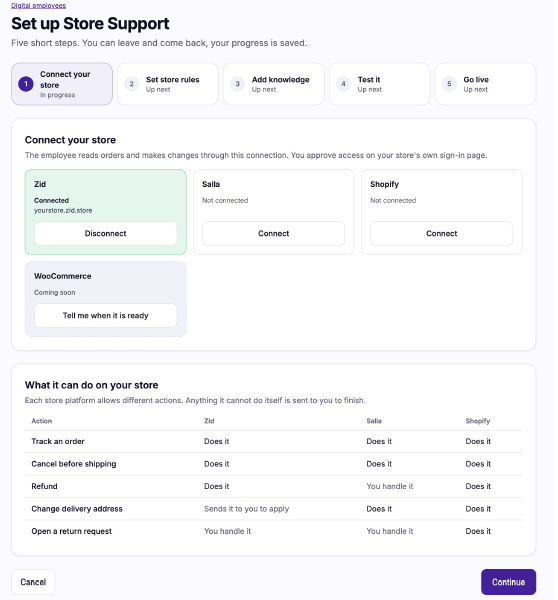
For the agent to read and act on order data, it needs a secure connection to the store system. Supported platforms may include Zid, Salla, and Shopify, depending on available integrations and the actions each system supports.
After selecting the store platform, the connection is made through the appropriate authorization flow, with the required permissions defined.
It is important to understand that each integration's capabilities may vary. One system may allow direct cancellation or refund, while another may require the store owner to perform certain actions manually. Review which actions are supported before going live with real customer requests.
Practical example: how the agent handles a cancellation
Say a customer sends: "I ordered the wrong size and I want to cancel."
The agent starts by requesting the information needed to verify the customer's identity, then queries the order status from the store.
If the order has not yet shipped, it moves to review the cancellation policy. Say the order total is 318 SAR, while the store settings allow automatic cancellation only up to 200 SAR.
In this case, the agent does not cancel the order directly. Instead, it creates an approval request for the store owner and tells the customer their request has been sent for review. Once a decision is made, the action can be completed and the customer notified.
This example shows the difference between an agent that only replies to messages and one that is connected to the actual operations of the store.
How do you track the agent's performance?
After going live, monitoring performance becomes as important as the setup itself.
Use the reporting dashboard to track:
- Number of conversations and queries resolved without human involvement
- Requests that required approval or escalation
- Response times
- Volume of order tracking, cancellation, refund, and address change requests
Can the agent work outside business hours?
The agent can be designed to receive and respond to queries outside the team's working hours, as long as the connected channels and systems are available. This is especially valuable for online stores that receive orders around the clock.
However, working around the clock does not mean every request will be resolved without human involvement. Some may need approval, additional information, or action from the store team. It is important to have a clear escalation process so customers are not given commitments the store cannot fulfill.
Does a customer service agent work for all online stores?
The agent is especially useful for stores that receive a high volume of repetitive inquiries, or that need to handle order tracking, cancellations, and refunds across multiple channels. It can also help small and medium-sized stores organize customer service without requiring every task to be handled manually.
Expected results vary by conversation volume, data quality, policy clarity, integration capabilities, and the nature of incoming requests. It is best to start with the most frequently repeated tasks, measure results, and then expand.
Frequently asked questions about building a customer service agent
Summary: build a customer service agent that fits your store
A successful customer service agent is not just about handling conversations — it is about how well it is connected to the store's real operations and policies.
Start by connecting your store, setting permissions, adding knowledge sources, and testing the core scenarios before going live on the channels your customers use.
After launch, track performance, unanswered questions, and pending approval requests — and use the results to improve service quality over time.
At Wkil, you can explore how to build a customer service agent that fits your business and configure it to work within your company's policies and tools.